忘记密码 ================
忘记密码URL
{{ '[忘记密码]({}/forgetpwd)'.format(sitedomain) }}: {{ '{}/forgetpwd'.format(sitedomain) }}
界面和功能流程
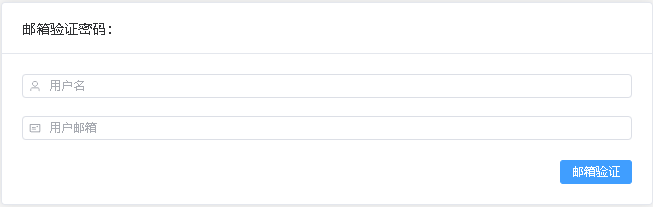
- 通过用户名和邮箱验证用户 ![通过用户名和邮箱验证用户](/_static/imgs/account-sign/forgetpwd01.PNG) - 邮箱收到含有激活token的链接,并通过此链接重置密码 ![通过邮箱获取token](/_static/imgs/account-sign/forgetpwd02.PNG) - 点击重置密码的激活链接,生成新密码 * URL:<{{ sitedomain }}/forgetpwd?token=eyJhbGciOiJIUzI1NiIsInR5cCI6IkpXVCJ9....> ![通过邮箱获取token](/_static/imgs/account-sign/forgetpwd03.PNG) ```{mermaid} :title: 功能流程 :align: center %%init:{'theme':'default', 'themeVariables':{'fontSize':'12px'}}%% graph TB A[忘记密码] --> B[输入注册用户名和邮箱] --> C[点击邮箱验证] --> D[进入邮箱,点击激活链接] --> E[点击重置密码生成新密码] --> F[新密码登录系统] class A,B,C,D,E,F proc-font12; ```
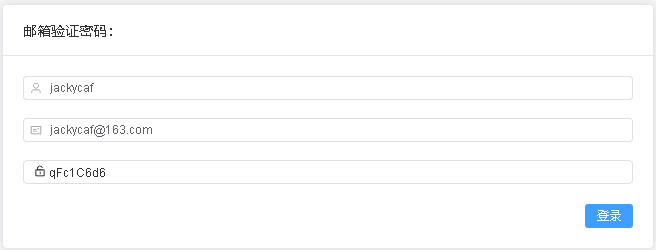
表单结构:
| 字段名称 | 说明 | 验证 | | ------------ | --------------- | ----------- | | 用户名 | 注册用户的用户名 | 用户名不能为空 | | 邮箱 | 注册用户的填写的邮箱 | 密码不能为空 | | 密码 | token验证后生成的新密码 | 系统生成 |
